David Lammering personal site

Autonomous Robot Navigation

A* path planning and postprocessing, implementation of pure pursuit for a TurtleBot and control and localisation for a simulated quadcopter. ROS2 and C++.

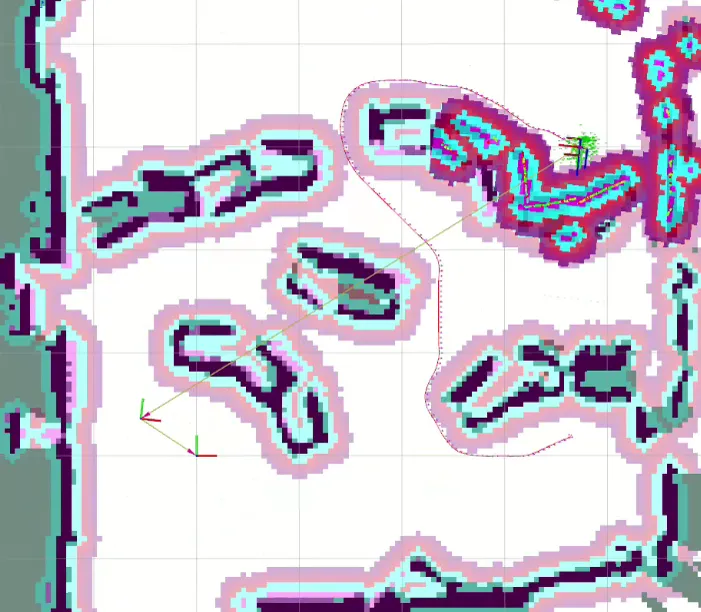
The pure A*-planner on the physical TurtleBot, with the inflated costmap and the planned path alongside.
Context
Robotics course, National University of Singapore, exchange semester, spring 2026
Team size
3, this page covers only my parts
Status
Completed

Planning on the TurtleBot

A* itself didn't return optimal results, even though it is supposed to. This is because those results are optimal only with respect to the 8-connected grid it operates on.
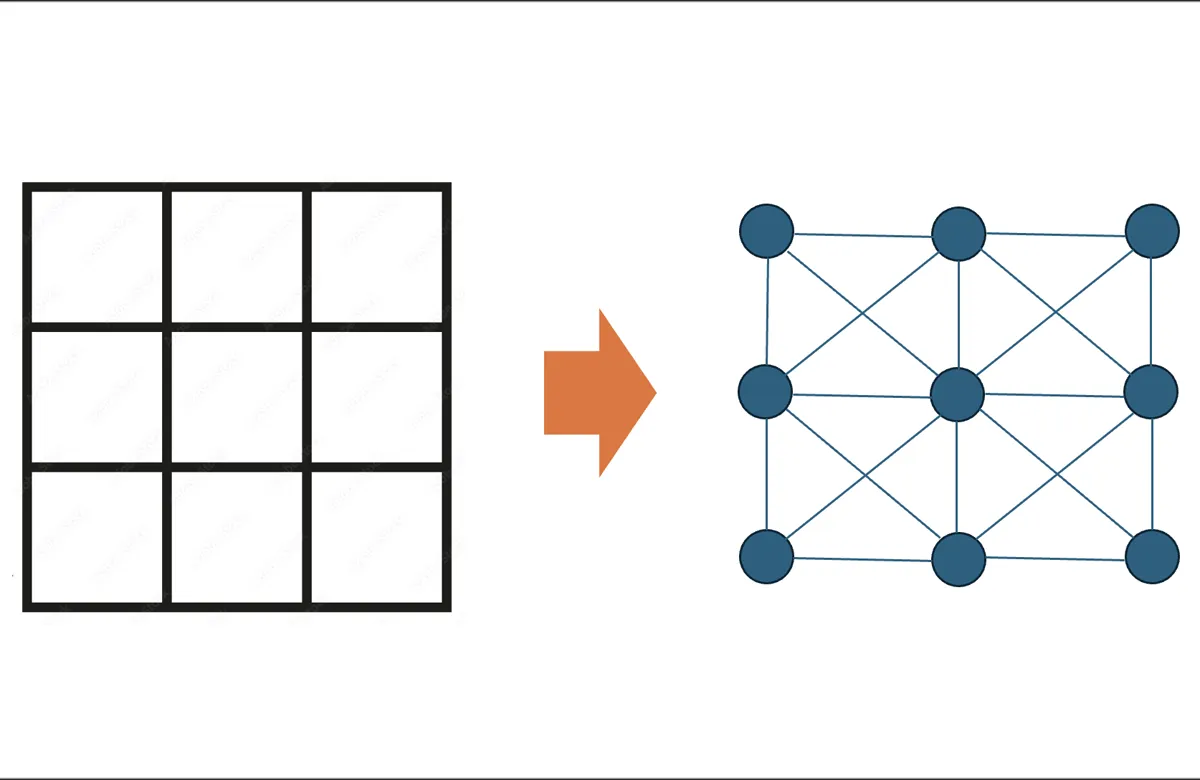
Diagram: on the left a three-by-three grid of square cells, an arrow, and on the right the same cells drawn as nine nodes each connected to its eight neighbours.
The map as an 8-connected graph.

That grid only moves in 45° steps, so the paths come out as zigzags: Optimal on the grid, but not the straight lines the robot could drive. So I added a post-processing pass: walk the path, and wherever two nodes have line of sight, delete everything between them and refill the straight segment by line rasterisation.
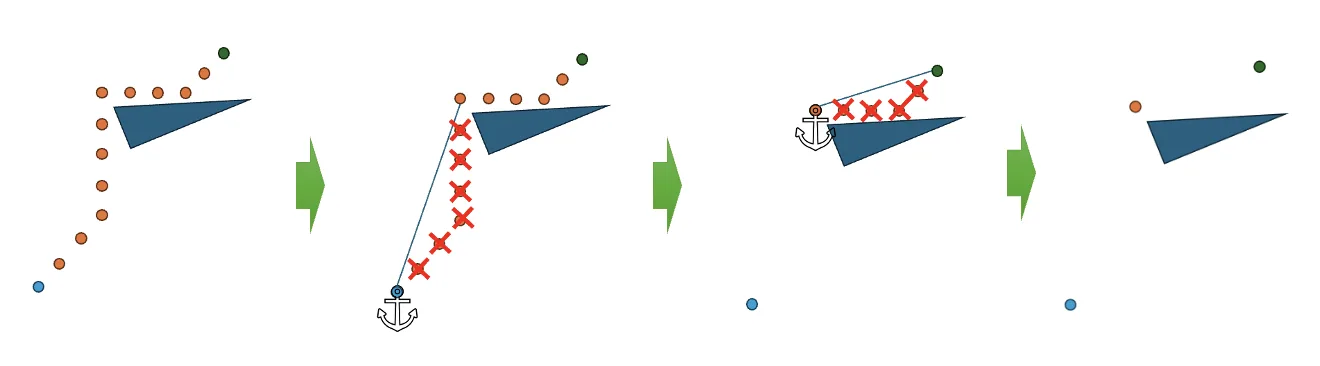
Four-step diagram. A chain of orange path nodes runs around a blue triangular obstacle from a blue start dot to a green goal dot. In the second panel an anchor marks the start node and red crosses mark the nodes that have line of sight to it. In the third the anchor has moved to the far end of that straight run and the next set of crossed-out nodes is marked. In the fourth only the start, one corner node and the goal are left.
The post-processing pass. An anchor is fixed on the path, the walk runs forward to the last node still in line of sight of it, every node between the two is dropped, and that node becomes the next anchor. What survives is the corners.
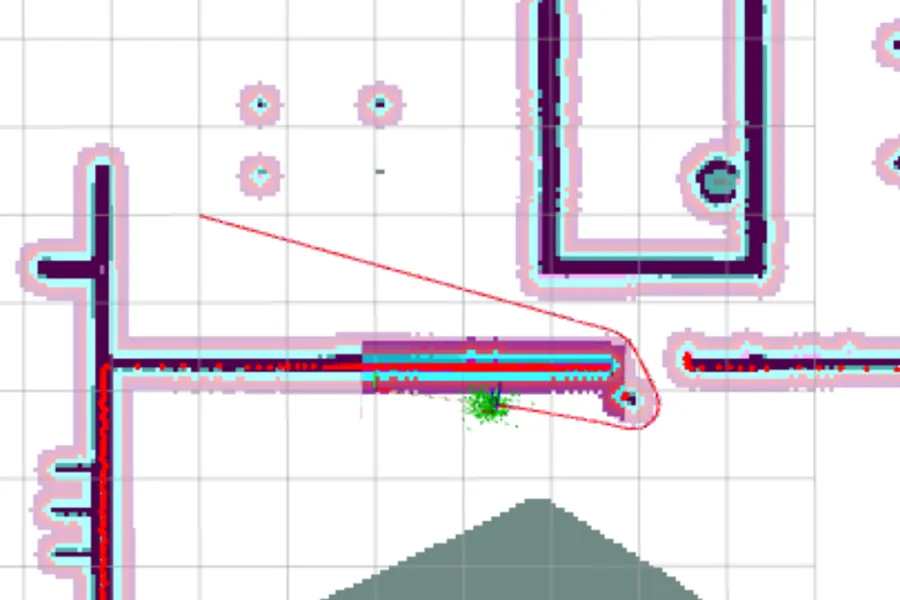
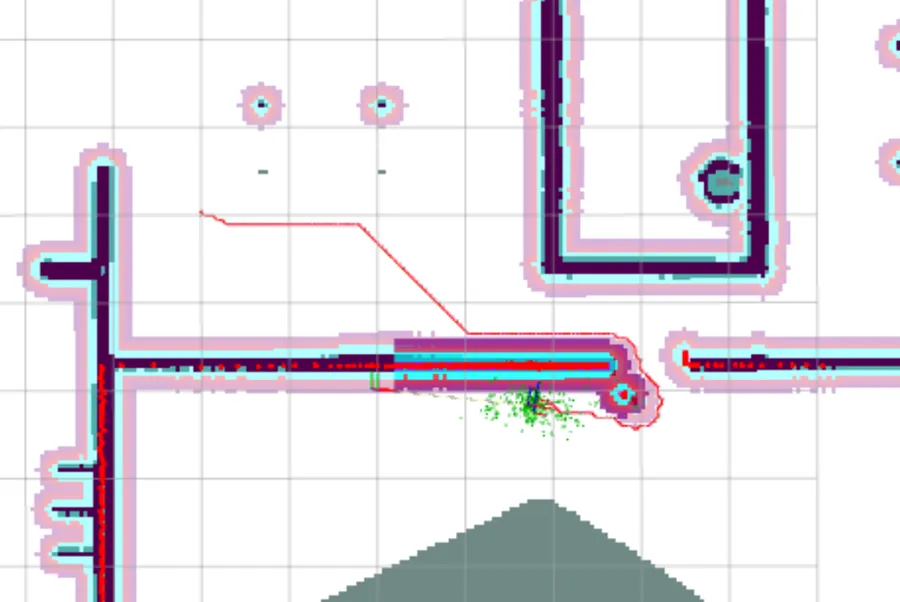
Detail of the costmap with the planned path drawn as a thin red line: it runs flat to the right, breaks into a 45-degree diagonal at a sharp corner, and meets the corridor mouth. The same detail with the same start and goal: the two legs have been replaced by one straight red line at a shallow angle running the whole way to the corridor mouth.
Before and after, on the same start, goal and map. Raw A*: a flat leg and then a 45° diagonal, because 0° and 45° are the only headings the grid offers. After the line-of-sight pass: one straight line at whatever angle the geometry wants. Over the whole plan that is 9.54 m down to 9.23 m, and 46.0 s down to 45.2 s of driving. The first frame is the planner's raw output; the second has also been through the team's Savitzky–Golay smoother, which is what rounds its corners.

The rasterisation is a supercover variant of Bresenham — it flags every cell the straight line touches rather than a one-cell-wide trace, so a shortcut cannot slip diagonally between two obstacle cells. A teammate wrote that part.

Teammates implemented Theta* and ran the evaluation: A* with post-processing gave slightly longer paths at a much lower runtime. The pure-pursuit controller and the obstacle inflation came from the course.

On the physical robot

The lab maze is roughly 5 × 5 m of cardboard, mapped by driving the TurtleBot through it under keyboard control and saving the SLAM map. The demo in the video at the top runs plain A*, not the post-processed planner.
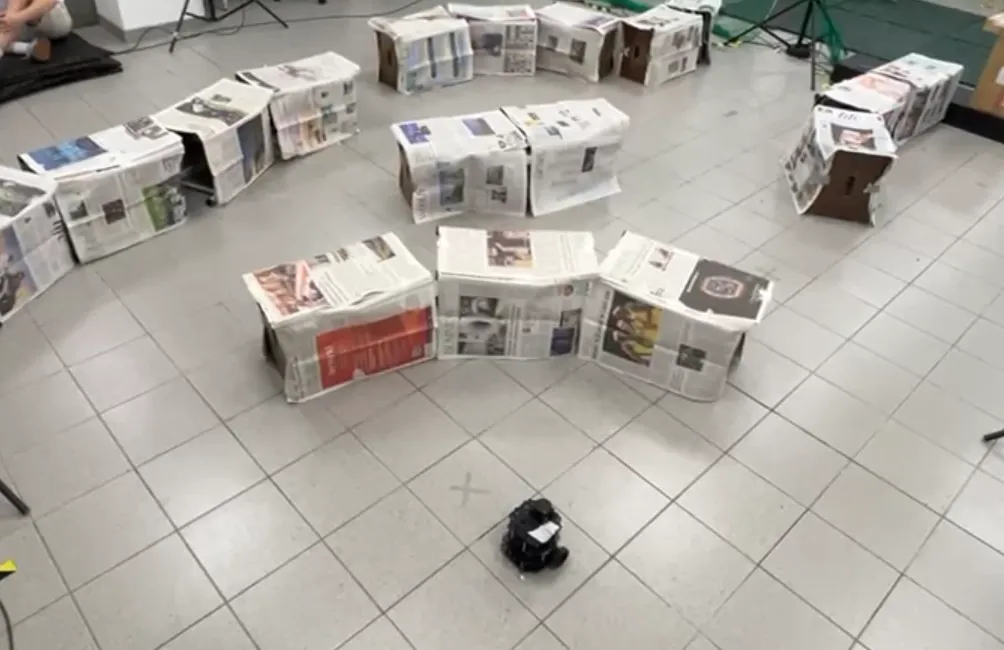
Photograph of a tiled lab floor with low cardboard boxes covered in newspaper arranged into a loose maze, and a small black TurtleBot sitting at a cross marked on the floor in the foreground.
The maze, and the TurtleBot on its start mark.
RViz view of the lab map built by SLAM: ragged dark obstacle outlines with inflation bands around them, and a thin planned path curving from the robot at the top right around two obstacles towards the goal.
The same maze as the planner sees it, with a global plan on it. The obstacle outlines are ragged because they are lidar returns off cardboard, not drawn walls.

That choice was deliberate: with corridors as narrow as 40 cm and a robot about 20 cm across, there is hardly any open space for a line-of-sight shortcut to cut across. The post-processed path comes out nearly identical to the grid path, so the demo gained nothing from it and the time went into the planner code instead. The gains in the figure above are real, but they are gains in open space.

Simulated quadcopter

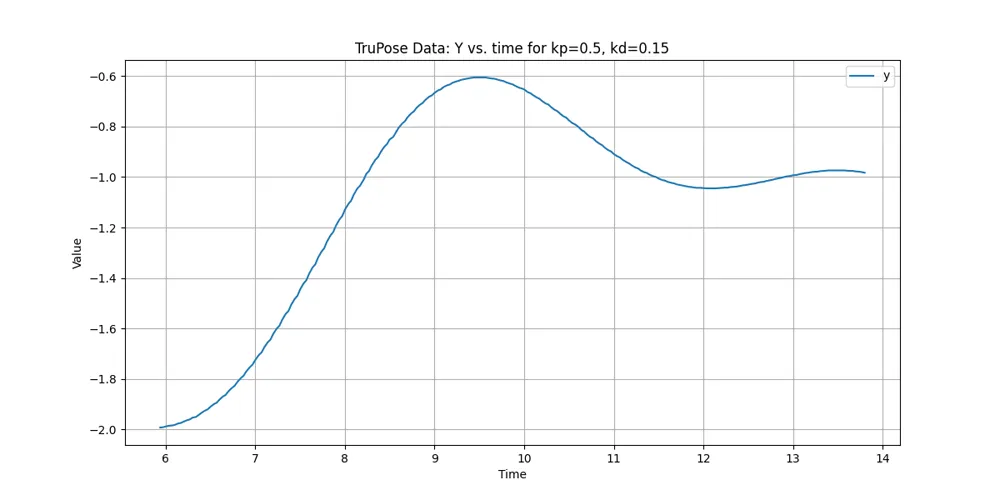
PID control and localisation with a plain linear Kalman filter, not an extended one. The plots below are the tuning.
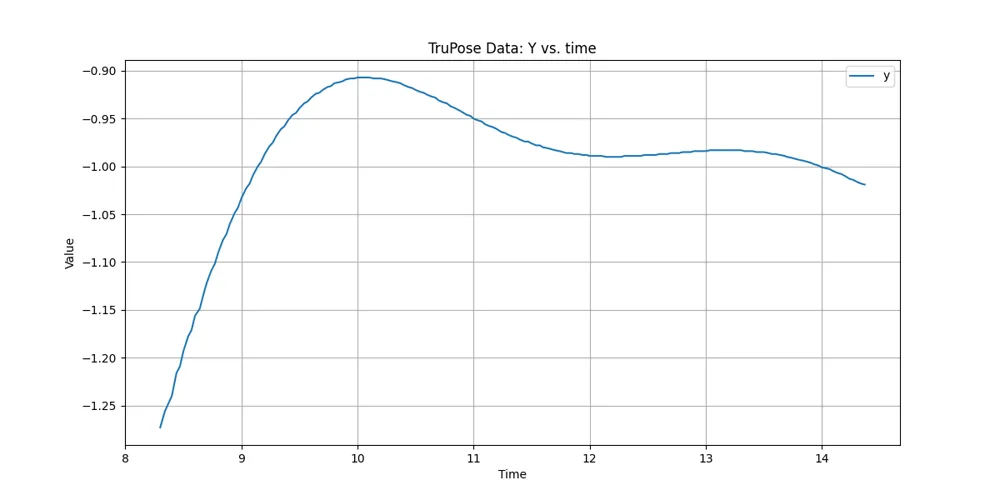
Line plot of the quadcopter Y position against time, rising to a peak above the target and settling with visible overshoot.
Y, kp = 0.5, kd = 0 — overshoot.
Line plot of the quadcopter Y position against time with derivative gain added, showing a smaller overshoot than the previous plot.
Y, kp = 0.5, kd = 0.15 — derivative gain pulls it in.
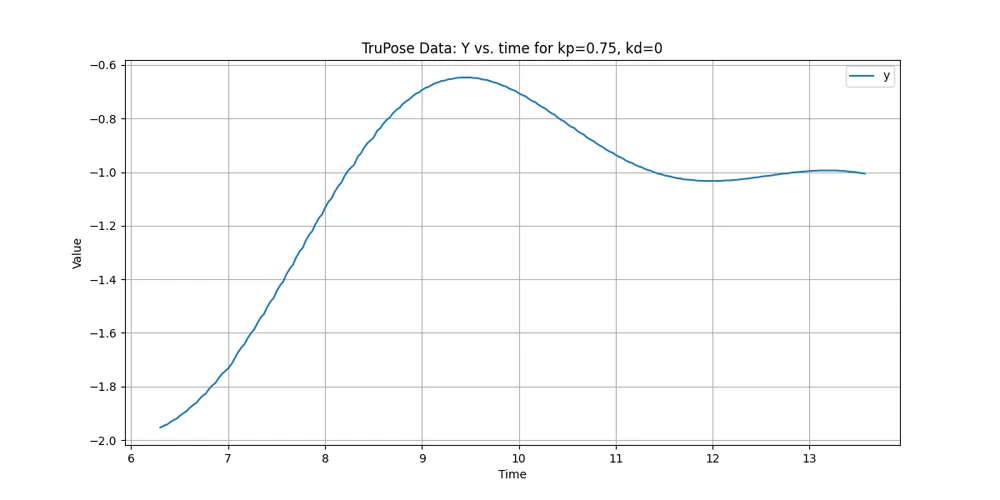
Line plot of the quadcopter Y position against time at a higher proportional gain, rising faster and overshooting the target.
Y, kp = 0.75, kd = 0.
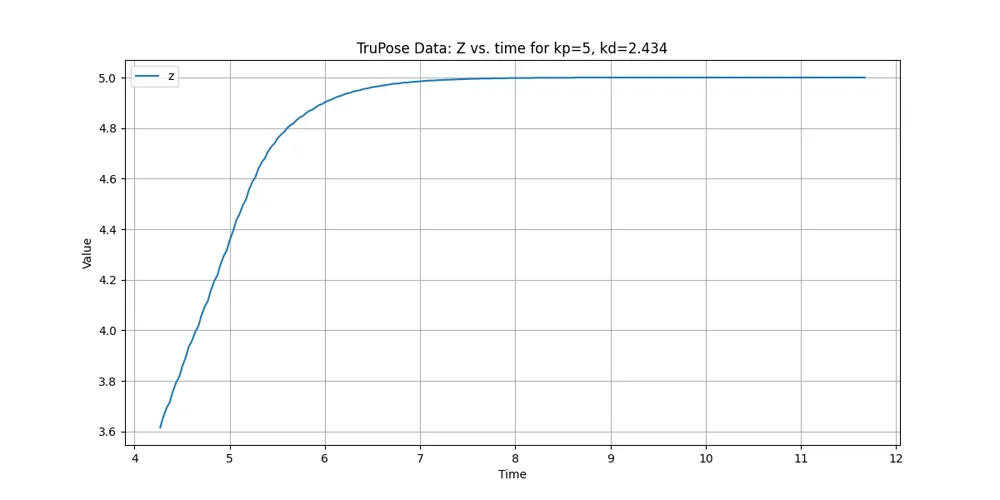
Line plot of the quadcopter Z position against time, climbing and settling on the target altitude without visible overshoot.
Z, kp = 5, kd = 2.434 — settles clean.
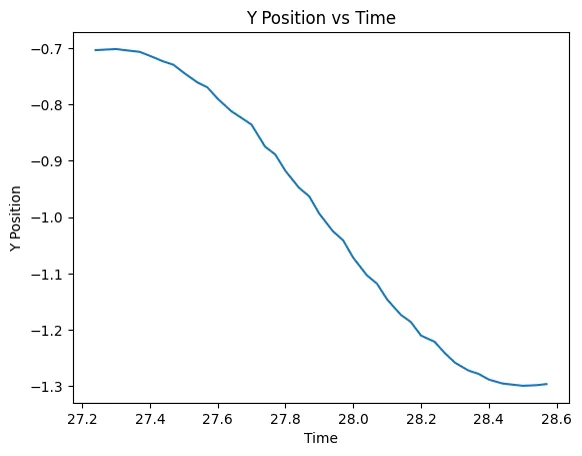
Line plot of the quadcopter Y position against time, falling smoothly from one value to another and levelling off.
Y position against time.
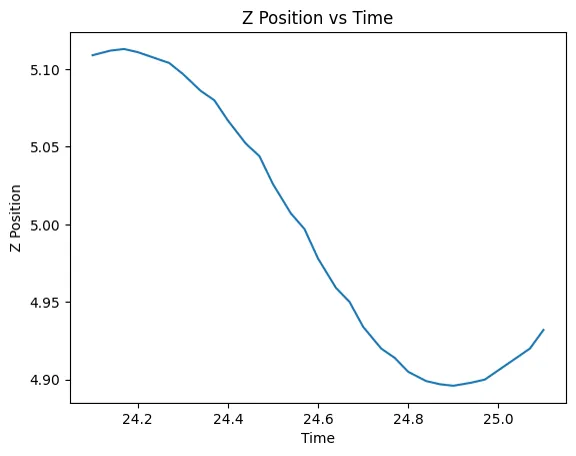
Line plot of the quadcopter Z position against time, dipping below the starting value and beginning to recover.
Z position against time.

What I would do differently

Line-of-sight smoothing is a repair applied after the search. The cleaner answer is to let the search consider straight-line connections in the first place — which is Theta*, and exactly the trade-off my teammates measured.